Coper Lab
SmileGrid — multi-branch dental booking
A working booking demo where booking rules shape the options shown — including available times, earliest alternatives network-wide, and self-service booking lookup.
- Project type
- Coper Lab
- Capabilities
- Create · Automate
- Built with
- Next.js · TypeScript · Tailwind CSS
Coper Lab
A working demonstration built by Coper. It runs on demonstration data, it was not commissioned by anyone, and the organisation it describes does not exist.
Why this project exists
Most appointment businesses take bookings through a form that is really a request: someone names a time, someone else checks the diary, and a call goes back and forth. The calendar is not the hard part. The rules around it are.
- A customer who is ready to book cannot see what is actually available
- What is bookable depends on the service, the location, the length and who is free
- Anything the form cannot answer becomes a phone call for staff to sort out
Interactive demonstration
The rules decide what can be booked
Pick a clinic, a treatment and a day. Opening hours, treatment length, who is working, blocked time and existing bookings decide which times appear — and what to offer when none do.
A Coper Lab demonstration. The times come from SmileGrid’s own scheduling engine, worked out in advance against invented clinics, practitioners and bookings. Nothing is booked, and nothing you select is stored or sent.
North clinic, check-up and clean, Tuesday: 21 open start times.
A full day doesn’t have to be a dead end.
Earliest open times this week
The engine works out these earliest open times for every request. This demonstration shows them when the chosen day has none.
Rules for this day
- Opening hours
- 09:00–18:00
- Treatment length
- 30 min
- Start times
- Every 15 min
- Practitioners
- 2 of 2 do this · 2 working
- Blocked
- Staff training 09:00–09:45 · Lunch break 13:00–14:00
- Held back
- Held for urgent cases 16:30–17:00
- Booked
- 3 start times full
Why these times?
The same rules apply to every start time on this day.
- North clinic is open 09:00–18:00 on Tuesday.
- Check-up and clean takes 30 minutes, and start times are checked every 15 minutes, up to 17:30.
- 2 of the 2 practitioners here do this treatment; 2 of them work on Tuesday.
- Blocked: Staff training 09:00–09:45; Lunch break 13:00–14:00.
- Held back: Held for urgent cases 16:30–17:00.
- Existing bookings leave no practitioner free at 3 start times.
Selected
A real booking would ask for name and contact details next. This demonstration stops here — nothing has been booked.
Most scheduling problems are rule problems.
Tell us what decides who can be booked, when and where — and where it still takes a phone call.
Walkthrough
How the flow works
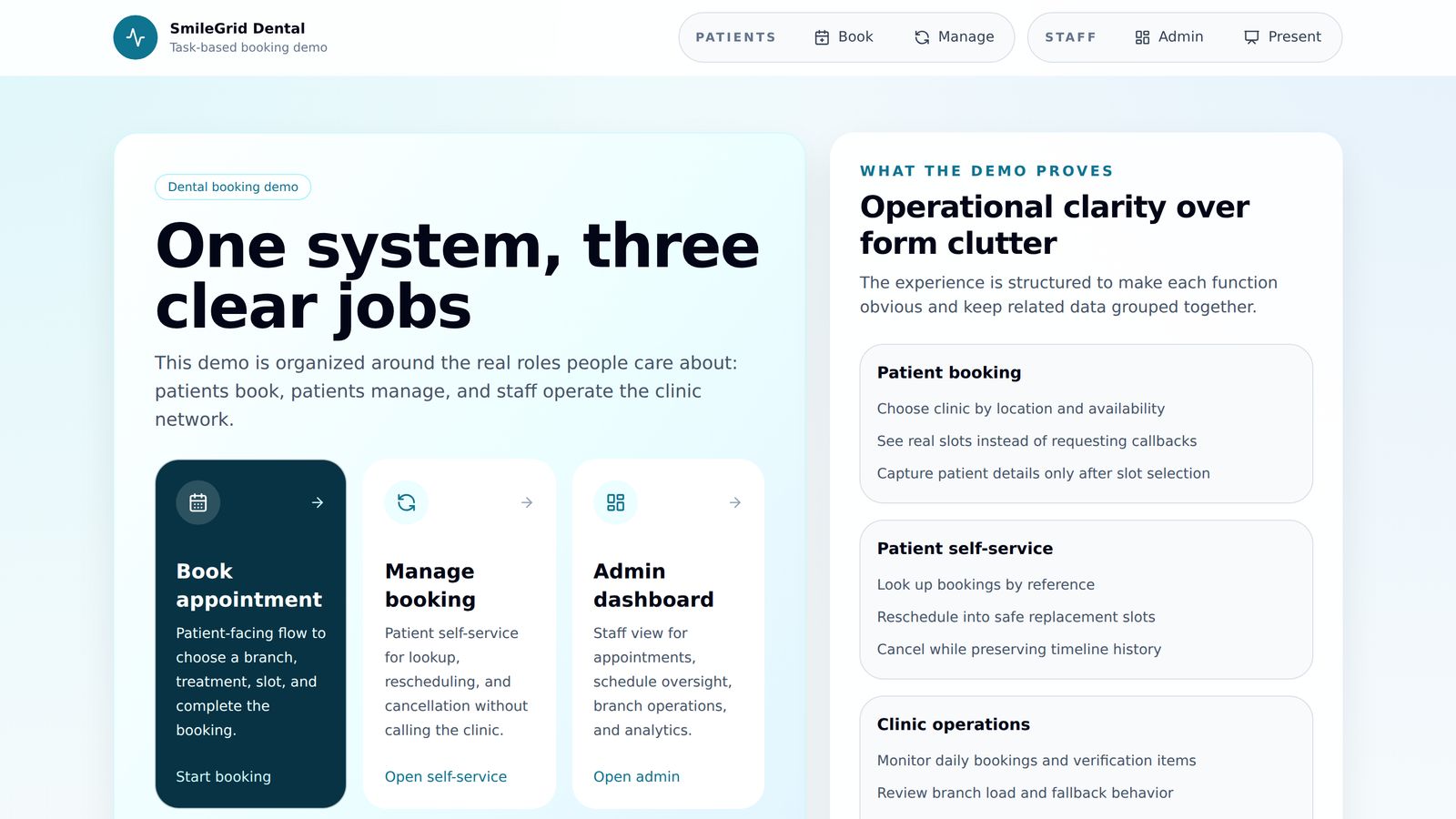
Three jobs, one system
Patients book, patients manage their own booking, and staff run the clinic network.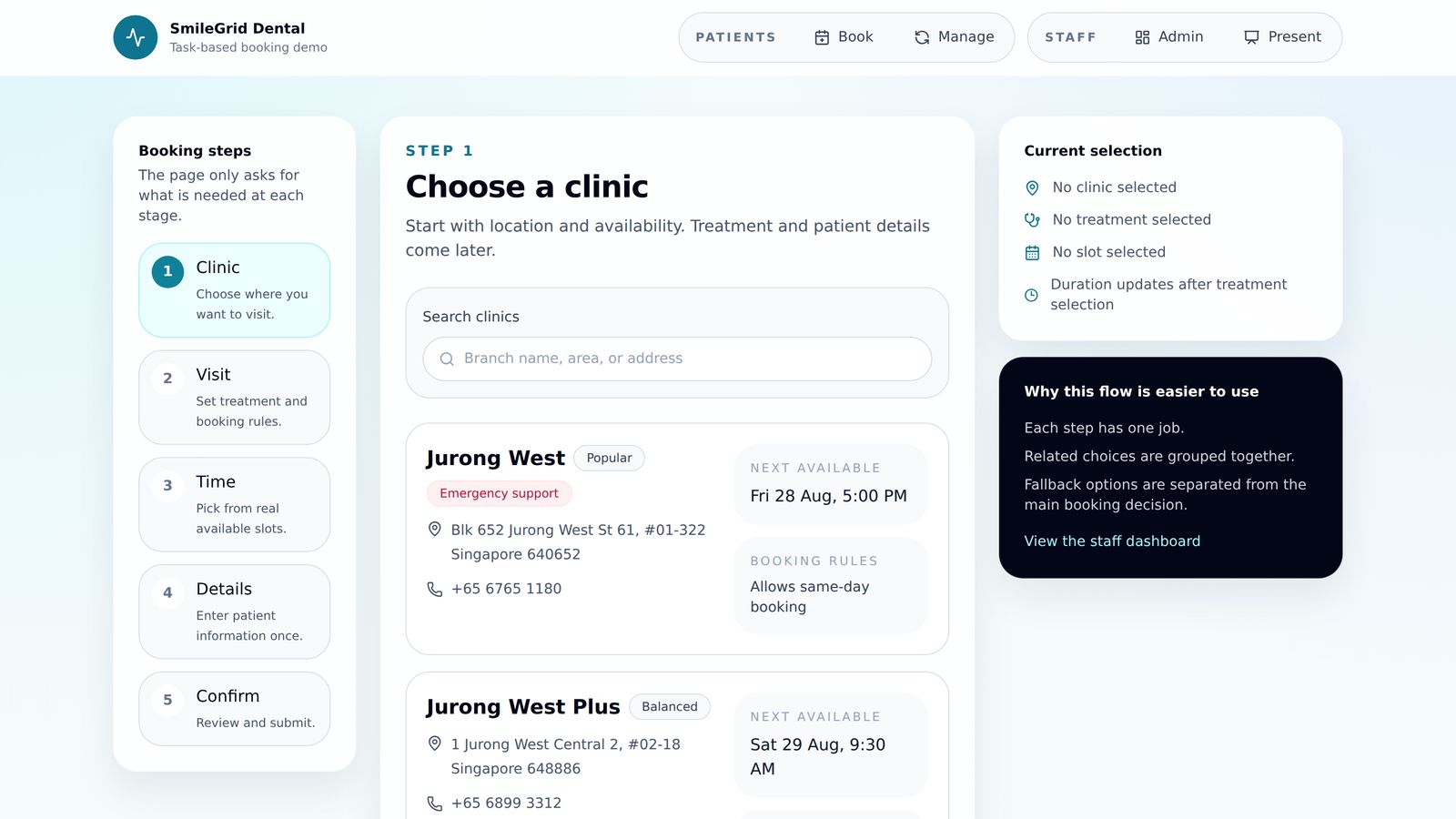
Start with the right clinic
Each branch shows its next available time and its own booking rules before anything is asked for.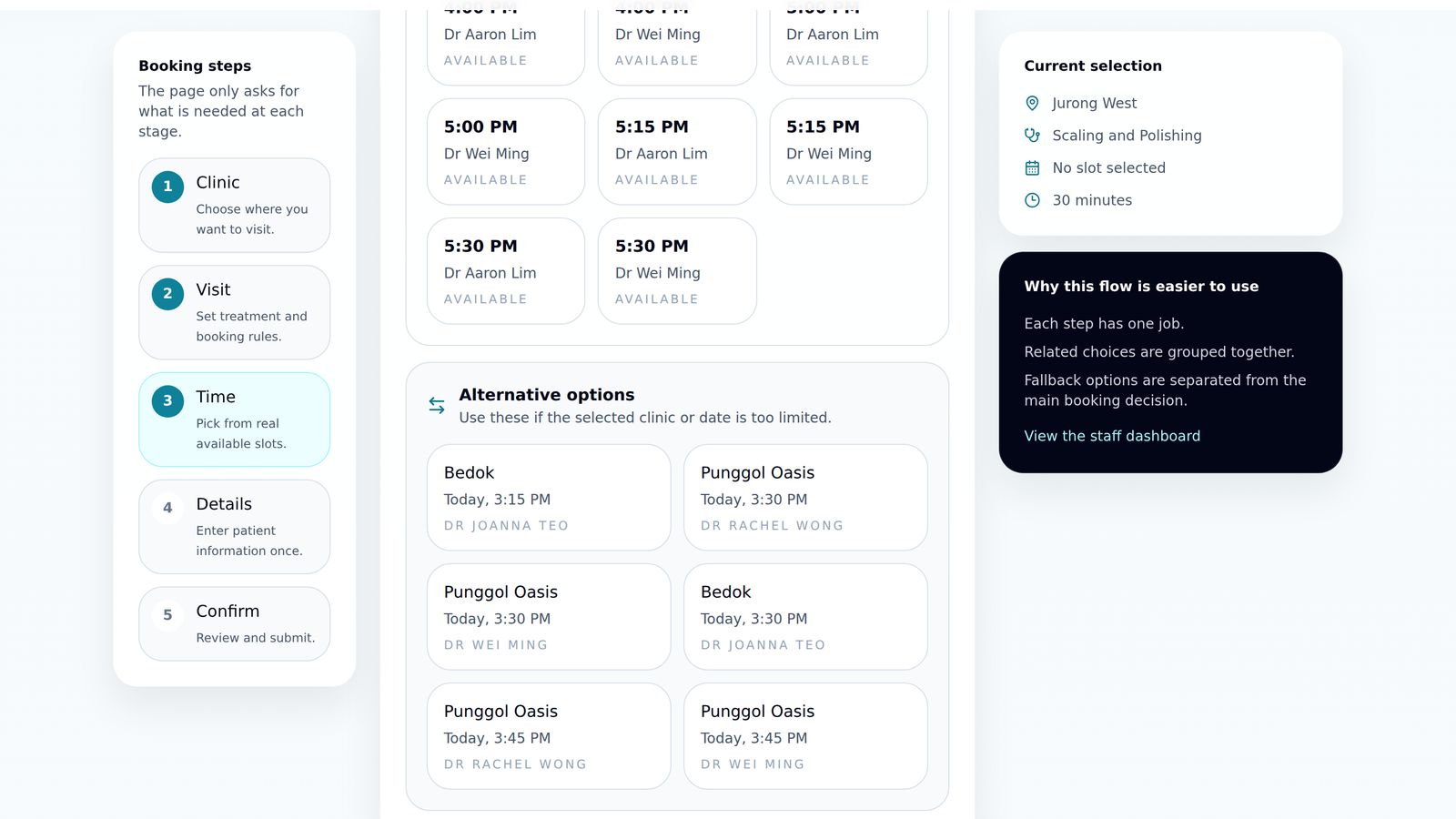
Real times, and a way round a full one
Times come from the branch and dentist rules. The earliest open times across all branches are listed separately.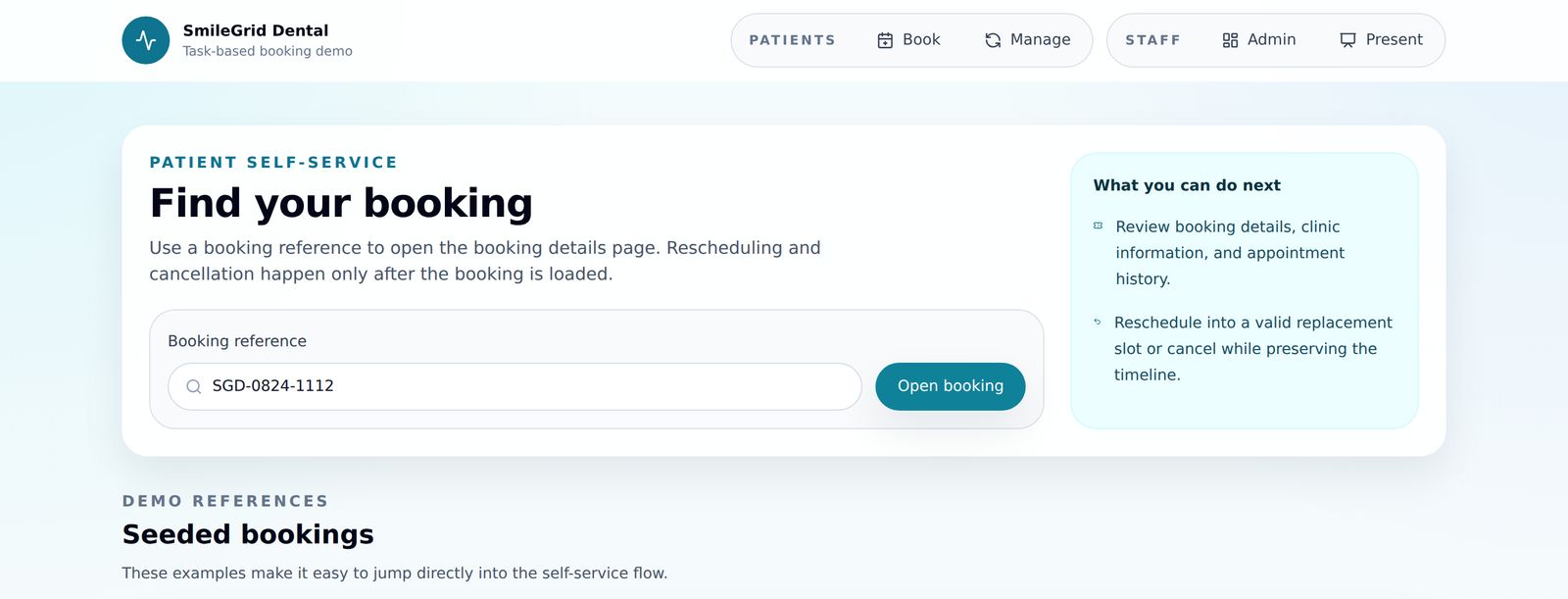
Find a booking without calling
A booking reference opens the booking so it can be moved or cancelled.
Rules first, then the calendar
The clinic's own rules — opening hours, treatment length, who is free, how much notice is needed — decide which times a patient is offered. Everything else is built on that.
- A guided flow that asks for name and contact details only once a time is chosen
- Times generated from branch hours, dentist availability, treatment length, blocked periods and same-day notice
- The earliest open times across every branch, listed alongside the chosen day
- Self-service lookup, reschedule and cancel from a booking reference
- A staff console for the day's appointments, schedules, slot controls, branches and dentists
Software around the workflow, not the other way round
Generic tools make a business fit its process to the software. Build around the workflow instead and customers get a simpler journey.
- What a customer is offered comes from the business's own rules, not a generic calendar
- A full day still shows the earliest open times across the network, rather than a dead end
- Simple booking tasks stop depending on somebody picking up the phone
- No integration is built here — the workflow is structured so a later one can build on the same foundation
Not just for bookings
The same approach can work for quotes, applications, reservations, service requests and other processes your team still handles by hand.
Build the workflow properly first, and future automation has something solid to build on.
Capabilities
What this project covers
- CreateBuild what your business needs
- AutomateSave time and run your business better
Evidence
What this shows
Directly observable
- The patient flow was driven end to end through branch, treatment, generated availability and patient details, and captured
- Slot availability shown in the capture is generated from the demonstration branch and dentist rules, not a fixed list
- Every staff console screen renders against the same demonstration data
What we are measuring next
There is nothing to measure. SmileGrid is a Coper Lab rather than a clinic deployment, so no booking volume, no-show rate, staff time or revenue figure has been observed, and none is claimed.
Under the hoodThe full list of what was built, and what we are not claiming
Everything this included
- A guided booking flow with one job per step: clinic, then treatment and visit details (including an optional reason for the visit), then a generated time, and only then name and contact details
- Slot generation from branch opening hours, dentist availability, treatment duration, blocked periods, emergency reserves and same-day notice rules
- A separate list of the earliest open times across all branches in the coming week, the chosen branch included, shown beside the chosen day's times
- Self-service lookup, reschedule and cancel from a booking reference, with the released slot returned to availability
- A staff console for appointments, the branch schedule, slot controls, branches, dentists and reporting
- A guided presentation mode for walking somebody through the system
What is not claimed
- SmileGrid is not a real business. The name, the branches, the dentists and the bookings are invented, and no clinic has used it
- It runs on demonstration data held in the browser — no database, no payment step, no notifications, and no integration with any practice-management or clinical system
- The interactive demonstration uses a different invented clinic network from the original case-study screenshots, so names and times differ
- Nothing here measures a business result. No booking volume, conversion, no-show rate, staff time or revenue figure has been observed, and none is claimed
- The staff console is not pictured. Its screens carry invented figures against invented patient names, and publishing them would put meaningless numbers on the page
- Delivering this for a real practice would start from that practice's own rules, systems and obligations
Related
The services behind this work
If you are working out whether something along these lines is worth building, we are happy to talk it through — including the parts that would not be worth doing.
Discuss a project